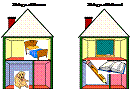
Use
the SuperGrouper Tool to Catagorize
Items
•Click “File” then
“New” to create a new picture.
•Click “Picture” under
“New”.
•Click the
“SuperGrouper” button and choose a
symbol.
•Type a heading for the
picture. Click outside the
picture.
•Click the
“SuperGrouper” button again. Add another
symbol with a heading.
•Students can drag
pictures from the picture pallette
into your groups.